
🧠 Java Architecture Explained: What Actually Happens When You Run a Java Program

Java is often praised for “Write Once, Run Anywhere” — but how does that really work under the hood?
Let’s break Java Architecture into a clean mental model you can remember forever.
This post walks through Java Architecture step by step, exactly how a Java program moves from source code to execution — in a way you can visualize and explain in interviews.
1️⃣ What Makes Java Special?
Java is a high-level, object-oriented, class-based language designed with one powerful idea:
Write Once, Run Anywhere
This is possible because Java does not compile directly to machine code.
Instead, it compiles to an intermediate format called bytecode, which is executed by the JVM.
That’s why Java powers:
Enterprise backends
Microservices
Web & mobile apps
Large distributed systems
2️⃣ Java Architecture: The Big Picture
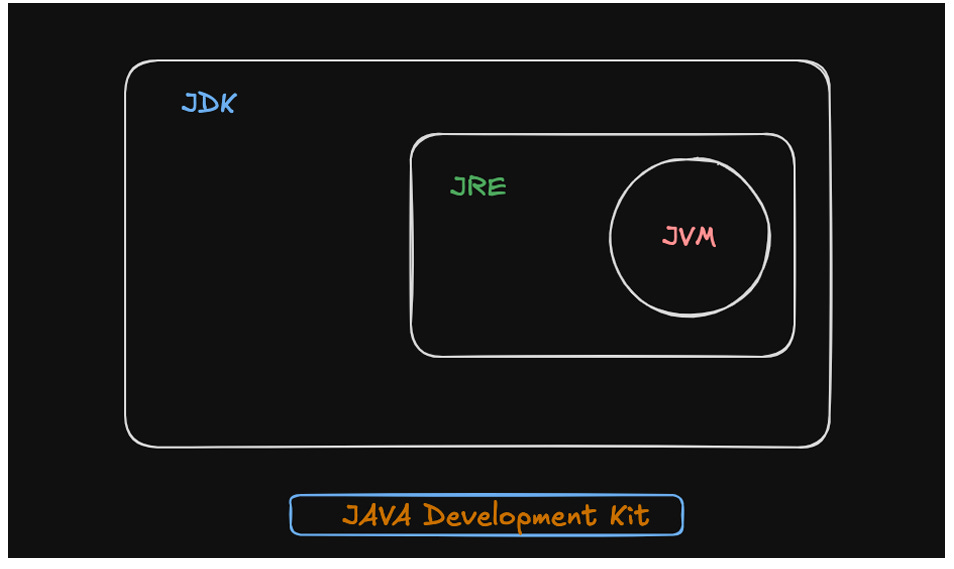
Java architecture is built in three layers:
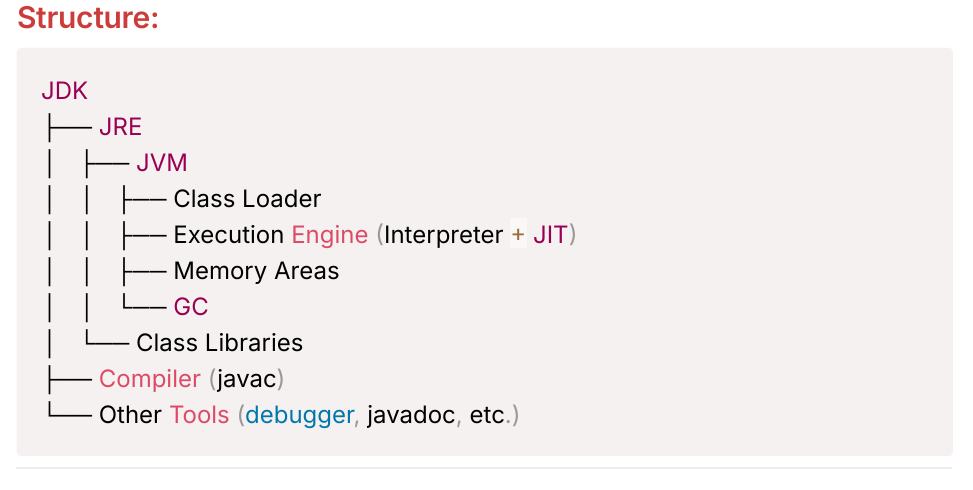
🔹 JDK (Java Development Kit)
Used by developers.
It contains:
javac(compiler)JRE
Debugger, Javadoc, and other tools
👉 If you write Java code, you need the JDK.
🔹 JRE (Java Runtime Environment)
Used to run Java applications.
It provides:
JVM
Core class libraries (
java.util,java.io, etc.)Class Loader
👉 Any system with a JRE can run a Java program.
🔹 JVM (Java Virtual Machine)
The heart of Java.
Responsibilities:
Converts bytecode into machine code
Manages memory
Handles garbage collection
Executes code safely and efficiently
👉 JVM is what makes Java platform-independent.
3️⃣ From .java to Execution: Program Flow
Step 1: Compilation
Developer writes
.javafilejavaccompiles it into.class(bytecode)Bytecode is OS-independent
javac MyClass.javaThis bytecode can now run on any machine with a JVM.
Step 2: JVM Invocation
javacommand launches the JVMJVM starts execution from the
main()method
java MyClass4️⃣ Class Loading (Security + Performance)
The JVM loads classes only when needed using Class Loaders.
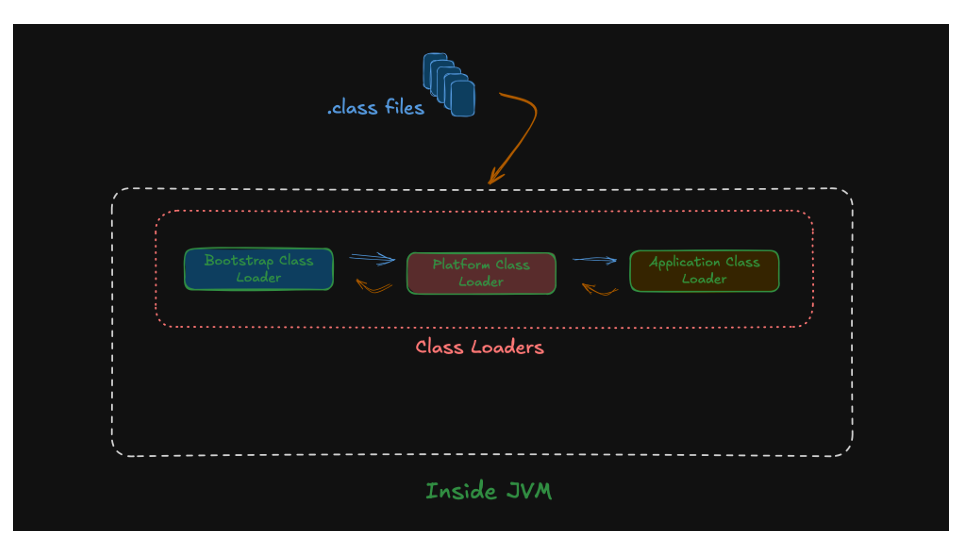
Three Class Loaders:
1. Bootstrap Class Loader
Loads core Java classes
Written in native code (C/C++)
Loads classes like:
java.lang.ObjectStringThread
2. Platform Class Loader (Java 9+)
Loads platform modules like:
java.sqljava.xml
3. Application Class Loader
Loads:
Your application classes
Third-party JARs
🔁 Parent Delegation Model
Class loading follows this order:
Application → Platform → Bootstrap
This ensures:
Core Java classes cannot be overridden
No duplicate class loading
Strong security guarantees
5️⃣ Linking & Initialization
Once a class is loaded, the JVM prepares it before execution.
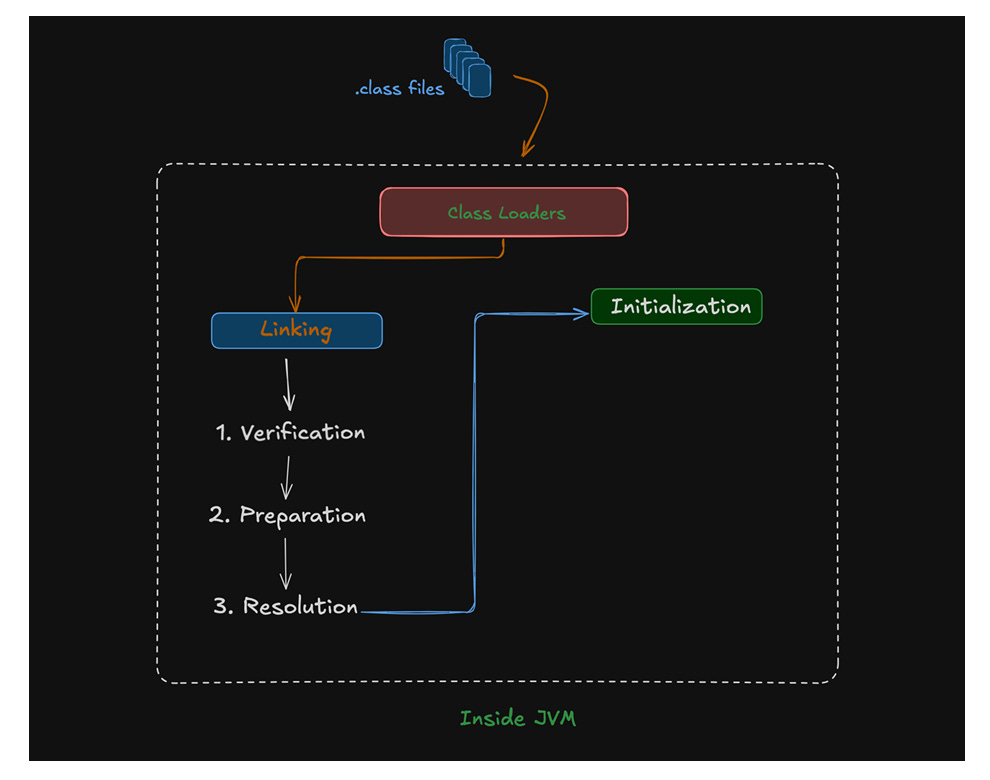
🔹 Linking (3 steps)
Verification
Checks bytecode validity
Prevents malicious or broken code
Preparation
Allocates memory for static variables
Assigns default values
Resolution
Resolves symbolic references
Loads dependent classes
🔹 Initialization
Static variables get actual values
Static blocks execute
Happens once per class
This ensures the class is fully ready before use.
6️⃣ JVM Memory Areas (Very Important)
🔹 Method Area (Metaspace – Java 8+)
Stores:
Class metadata
Method definitions
Static variables
Runtime Constant Pool
Shared across all threads.
🔹 Heap
Stores objects and arrays.
Divided into:
Young Generation (Eden + Survivor)
Old Generation
Objects:
Start in Young Gen
Move to Old Gen if they survive GC cycles
🔹 JVM Stack
One stack per thread
Stores method frames
Follows LIFO (Last In, First Out)
🔹 PC Register
Tracks the current execution instruction
One per thread
🔹 Native Method Stack
Supports native code (C/C++) via JNI
7️⃣ Execution Engine (Where Performance Comes From)
The Execution Engine runs bytecode using:
🔹 Interpreter
Executes line by line
Faster startup
Slower execution
🔹 JIT Compiler
Detects frequently executed code (“hot spots”)
Converts them into native machine code
Improves performance over time
🔹 Garbage Collector
Automatically frees unused memory
Works alongside the execution engine
👉 This is why Java apps get faster the longer they run.
🧠 Final Takeaway
Java is not slow.
Java is carefully engineered.
If you understand:
JVM internals
Memory model
Class loading
Execution flow
You stop being a framework-dependent developer and start thinking like a Java engineer.
Solid breakdown of JVM internals. The JIT compiler detail is underrated because most devs dunno how much warmup time matters in prod. I once debugged a latency spike that dissapeared after adding heavier load tests because the JIT kicked in earlier. Worth mentioning C2 compiler thresholds for folks tuning high-throughput apps.